Mode Select Dialog
This dialog asks whether the vehicle should run a workflow as the main vehicle or as a support vehicle. Its title bar shows the name of the workflow being started.
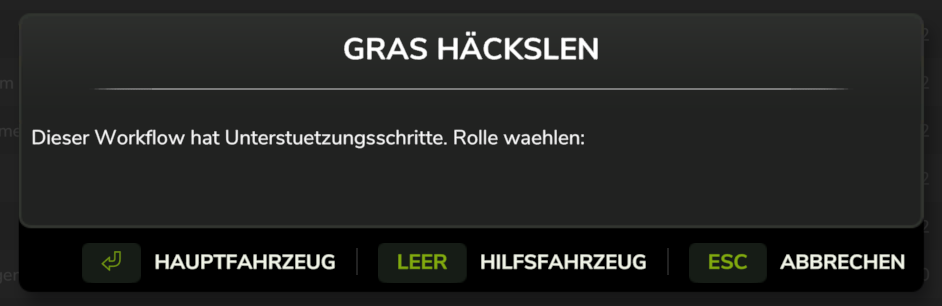
When it appears
It appears on Start only when the selected workflow actually contains support sub-steps. A workflow with no support sub-steps has nothing to choose between, so the dialog is skipped and the vehicle starts as the main vehicle.
Choices
| Button | Effect |
|---|---|
| Main | The vehicle runs the workflow's main steps — the combine, harvester, or whichever vehicle does the primary job |
| Support / F | The vehicle runs the support sub-steps nested under each main step, following the main vehicle's progress |
| Cancel / Esc | Nothing starts |
Start the main vehicle first, then the support vehicle — a support vehicle needs a main vehicle to follow before it has anything to do.
What each role does
A main vehicle executes steps 1, 2, 3… in order. A support vehicle ignores those and instead executes the sub-steps attached to whichever main step the main vehicle is currently on. When it finishes its sub-steps for that step, it waits until the main vehicle advances.
The HUD reflects the role: a support vehicle shows a sub-step counter like Step 2.1/2 and a
Waiting for main vehicle status, while a main vehicle shows a badge counting its active
support vehicles. See HUD Controls.
Not the same as the queue system
This dialog is easy to confuse with the Leader Vehicle Select Dialog, which also appears at start time:
| Mode Select | Leader Select | |
|---|---|---|
| Asks | Which role in this workflow | Which other vehicle to wait on |
| Appears when | The workflow has support sub-steps | Other vehicles are already running workflows |
| Result | Vehicle runs main steps or sub-steps | Vehicle runs its own workflow, pausing at checkpoints |
Support vehicles share one workflow and execute different parts of it. Followers run their own workflow and only pause where you placed explicit markers. See Multi-Vehicle Workflows and Queue System.