Web Editor
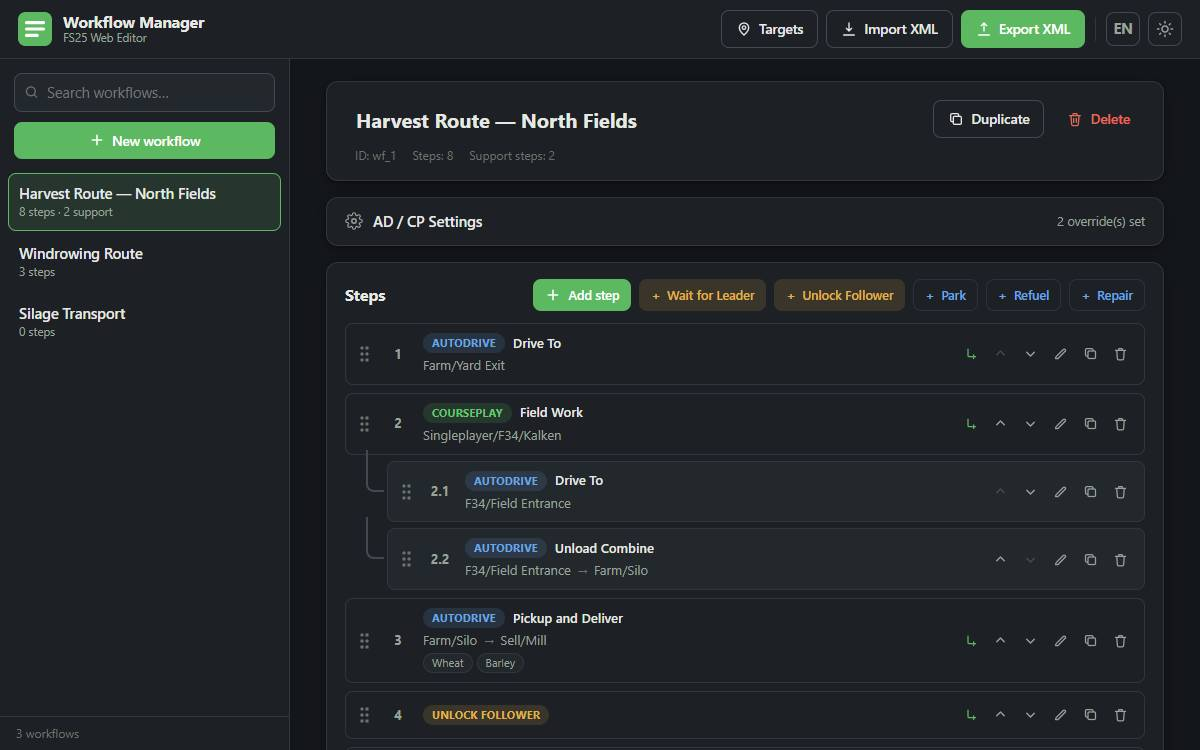
The Web Editor is a standalone browser app for building Workflow Manager workflows without the
game running. It produces a game-ready workflowManager.xml that you drop into your savegame
folder — useful for planning long workflows on a second monitor, or editing them comfortably with
a real keyboard instead of the in-game dialogs.
It's a static page with no server, no account, and no build step. Everything stays in your browser.
What it can do
The editor mirrors the in-game editor feature for feature:
- Workflows — create, rename, duplicate, delete, and search
- All seven step types — AutoDrive, Courseplay, the sync markers Wait for Leader and Unlock Follower, and the targetless Park / Refuel / Repair steps (quick-add buttons, no dialog needed)
- AutoDrive modes — Drive To, Pickup & Deliver, Deliver, Load, Unload, with the same dynamic target and second-target labels as the Step Dialog
- Courseplay actions — Field Work and Bale Collect
- Fill types — multi-select with search; the full FS25 base list is built in, and custom mod fill type IDs can be typed in by hand
- Support sub-steps — nest, reorder, edit, and duplicate support-vehicle steps under any main step (see Multi-Vehicle Workflows)
- AD/CP settings per workflow — Unload Fill Level (%), Pipe Offset (m), Pre-Call Level (%)
- Reordering — move buttons and drag & drop
- Autosave to browser local storage, light/dark mode, and an English/German interface
Sync markers are deliberately not offered inside support sub-steps — exactly as in-game, leader/follower pairing is built from main steps only. See Queue System.
The editor always offers all seven types — a browser can't tell whether AutoDrive is installed. In-game, AutoDrive is optional: a workflow with AutoDrive, Park, Refuel, or Repair steps needs it to start, while a Courseplay-only workflow runs without it.
Round-tripping your savegame
- Import your existing
workflowManager.xml— use the file picker or just drop the file anywhere on the page. - Build or edit your workflows.
- Export XML, then replace
workflowManager.xmlin your savegame folder (.../My Games/FarmingSimulator2025/savegameN/) while the game is closed.
Older save formats — linked-workflow pairs and per-step sync flags — are migrated on import using
the same rules as WorkflowStorage.lua in-game, so an old file imports cleanly and exports as
current formatVersion 2. The HUD position and the mod settings stored in an imported file (such
as Resume Courseplay after loading) are preserved on export.
Export replaces the whole file. Close the game before overwriting workflowManager.xml, or the
game will write its in-memory copy back over your changes on the next save. Keep a backup of the
original file until you've confirmed the workflows load correctly.
Target suggestions
The editor doesn't know your map, so target fields are free text by default. You can teach it your names three ways:
- Maintain the AutoDrive destination and Courseplay course lists by hand
- Import marker names directly from an
AutoDrive_config.xml - Import course names from your Courseplay course files
Once loaded, targets autocomplete as you type.
Courseplay course names are stored as folder-qualified paths (for example
Singleplayer/F34/Kalken). When importing course names, keep the folder structure intact — a bare
course name can match the wrong field if the same name exists in more than one folder. See
Course Selection.
Running it locally
The editor is a plain index.html — download the repository and open the file directly in a
browser. No web server needed.
Source and issues: FS25_WorkflowManagerWebeditor